Let’s be honest, we’ve all been there. You’re deep into a project, and you suddenly realize your shoulders are best friends with your earlobes. Or maybe your arms feel like they’re just… floating in space, unsupported. These little discomforts are often the first signs that your chair is working against you, not for you. A huge part of this puzzle, and a question we get all the time, is What Is The Ideal Armrest Width? It seems like a small detail, but getting it right is a game-changer for your comfort, posture, and long-term health.
Your office chair isn’t just a place to sit; it’s your command center for eight-plus hours a day. And just like a pilot needs their controls in the perfect spot, you need your support system dialed in. The width of your armrests plays a crucial role in preventing that nagging neck pain, shoulder strain, and even wrist fatigue that can creep up after long hours. In this guide, we’re going to break down exactly how to find your perfect fit, turning your chair from a source of pain into your greatest productivity ally.
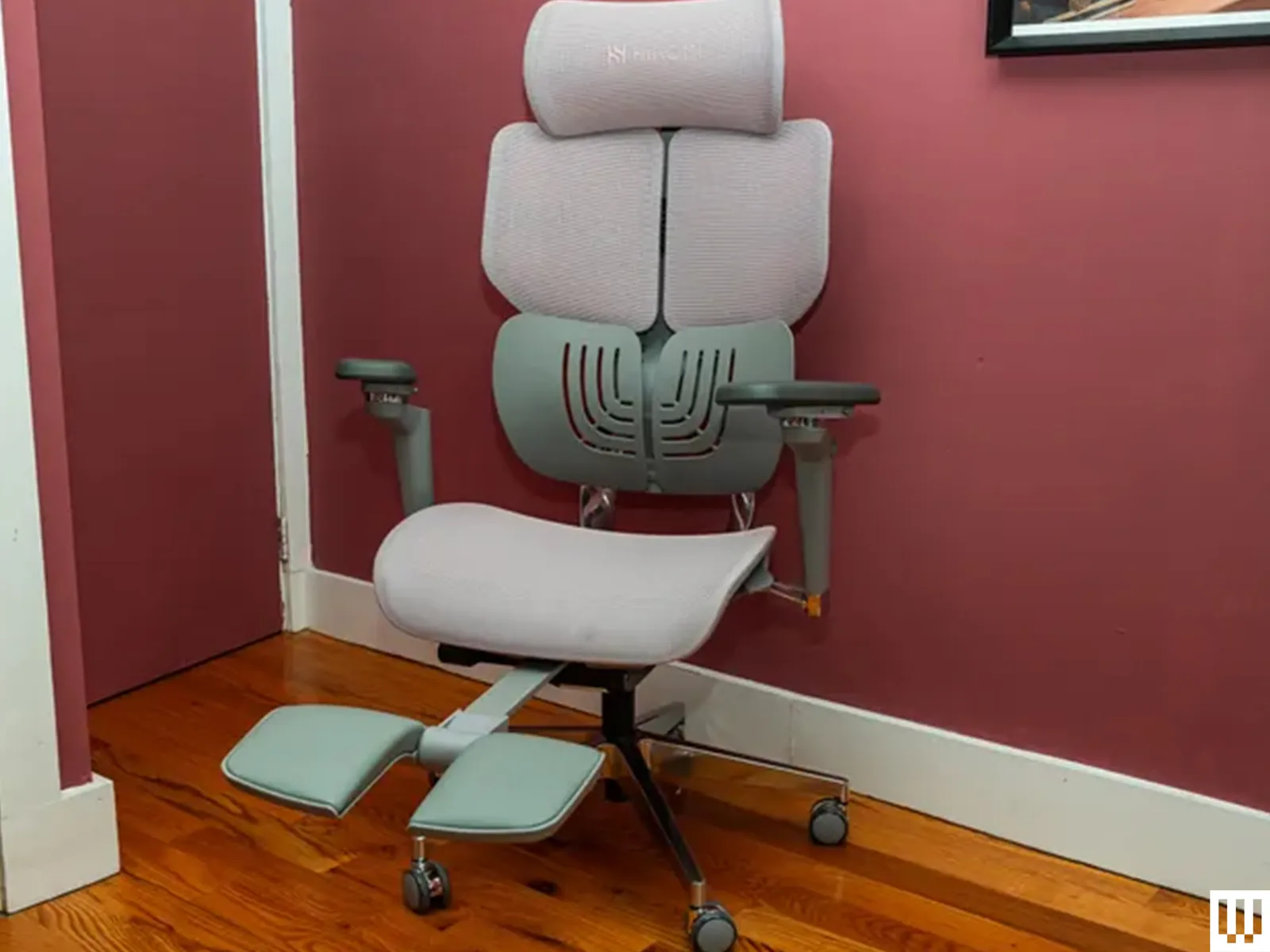
Why Armrest Width is More Than Just a Number
Before we jump into measurements, let’s talk about the “why.” Why does this one adjustment matter so much? Think of your arms. They have weight. When they aren’t properly supported, your neck and shoulder muscles have to pick up the slack, holding them up all day long.
This constant, low-level tension is a recipe for disaster. It can lead to:
- Shoulder and Neck Pain: When armrests are too wide, you’re forced to splay your arms outwards, straining your rotator cuff and trapezius muscles (the big ones connecting your neck and shoulders). Too narrow, and you’re hunched over, creating a different kind of tension.
- Poor Posture: Your arm position directly influences your upper body posture. Incorrect armrest width can cause you to slump or hunch, undoing all the benefits of that fancy lumbar support you invested in.
- Wrist and Forearm Strain: Proper arm support ensures your wrists can maintain a neutral, straight position while typing or using a mouse. Without it, you might be angling your wrists unnaturally, increasing the risk of repetitive strain injuries like carpal tunnel syndrome.
Getting the armrest width right isn’t about luxury; it’s about fundamental ergonomic support that allows your body to relax into a neutral, sustainable posture.
So, What is the Ideal Armrest Width? The Simple Answer
The ideal armrest width is the one that allows you to sit with your shoulders relaxed and your arms resting comfortably at your sides. Your elbows should form a roughly 90-degree angle, with your forearms parallel to the floor and naturally supported without you having to reach or scrunch.
That’s the core principle. The goal is to mimic your natural resting posture. If you stand up and let your arms hang loosely at your sides, that’s the approximate width you’re aiming for. Your armrests should slide right into that space, taking the weight off your shoulders.
The “Shoulder-Width” Rule Explained
A great rule of thumb is to set your armrests to be about shoulder-width apart. However, this doesn’t mean the width of your shoulders from edge to edge. It refers to a position that allows your upper arms to hang vertically from your shoulders.
Imagine a straight line dropping from the center of your shoulder joint down to your elbow. That’s the line your armrest should support. When they’re set correctly, you should be able to rest your elbows and forearms on the pads without shrugging your shoulders up or pushing your arms out.
Why “One-Size-Fits-All” Fails Miserably
This is precisely why chairs with fixed, non-adjustable armrests are an ergonomic nightmare. People come in all shapes and sizes. A width that’s perfect for a person with broad shoulders will be far too wide for someone with a narrower frame, leaving their arms completely unsupported. This is where the magic of a truly ergonomic chair comes in—adjustability is not a feature, it’s a necessity.
Bảng trống.How to Measure and Set Your Ideal Armrest Width: A Step-by-Step Guide
Ready to dial in your setup? It only takes a minute, but the payoff in comfort is immediate. Follow these simple steps:
- Start with Your Core Posture: Before you even think about your arms, get the rest of your posture right. Sit all the way back in your chair so your back is in contact with the backrest. Your feet should be flat on the floor (or on a footrest), with your knees at roughly a 90-degree angle.
- Relax Your Shoulders: This is the most important step. Take a deep breath and consciously let your shoulders drop. Let them go completely limp. Don’t hold any tension. This is your neutral, natural shoulder position.
- Position Your Arms: Let your arms hang naturally by your sides. Now, bend your elbows to about 90 degrees, as if you’re about to start typing.
- Adjust the Armrest Width: Now, adjust the width of your armrests (usually via a lever or button underneath the arm pad) so they slide in to meet your arms. They should be just close enough to comfortably support your forearms without you having to push your elbows out.
- Check for Clearance: You don’t want the armrests to be so narrow that you feel pinned in. There should be a little bit of space—about an inch or two—between your hips/thighs and the armrest posts. You should feel supported, not restricted.
- Do a Task Test: Don’t just set it and forget it. Spend a few minutes performing your usual tasks. Type an email. Use your mouse. Do you feel your shoulders start to creep up? Do you have to reach? If so, make micro-adjustments until it feels completely effortless.
“The goal of an armrest is to offload the weight of the arms from the neck and shoulder muscles. If you have to actively reach for your armrests, they are failing at their primary job. They should meet you where you are, not the other way around.” – Dr. David Miller, Occupational Health Specialist
Beyond Width: The Other Crucial Armrest Adjustments
While finding the what is the ideal armrest width is your primary goal, it’s only one piece of a multi-dimensional puzzle. Truly great ergonomic chairs offer “4D armrests,” meaning they adjust in four directions.
Armrest Height
Once the width is set, adjust the height. The armrests should be at a level where they support your elbows without causing your shoulders to shrug. A common mistake is setting them too high, which creates tension. The correct height should allow your forearms to be parallel to your desk surface.
Armrest Pivot (Angle)
This allows you to angle the arm pads inwards or outwards. If you’re typing, pivoting the armrests slightly inward can provide better support for your forearms. If you’re relaxing or reading on a tablet, you might pivot them outward.
Armrest Depth (Forward/Backward)
This adjustment lets you slide the arm pads forward or backward. You want to adjust the depth so the pad supports the bulk of your forearm, but doesn’t get in the way of your desk. Your elbow should rest comfortably near the back of the pad.
Common Mistakes to Avoid
- Setting them too wide: This is the most frequent error. It offers zero support and promotes shoulder strain.
- Setting them too high: This is just as bad as having no support, as it actively pushes your shoulders up, creating instant neck tension.
- Forgetting to readjust: Your ideal position for typing might be different from your position for a video call or for gaming. Don’t be afraid to make small adjustments throughout the day.
- Letting them interfere with your desk: If your armrests are preventing you from getting close enough to your desk, you’ll end up leaning forward, ruining your posture. Make sure they can slide under the desk edge if needed.
Frequently Asked Questions (FAQ)
Q1: How wide should my chair armrests be?
A: Your armrests should be set to a width that allows your arms to hang naturally from your relaxed shoulders. Your elbows should be close to your body, not splayed out, and your forearms should be comfortably supported.
Q2: Should my elbows touch the armrests when typing?
A: Yes, ideally. The armrests should support the weight of your forearms, which includes your elbows. This support prevents your shoulder and neck muscles from having to carry that load, reducing fatigue and strain during long typing sessions.
Q3: Is it better to have a chair with or without armrests?
A: For anyone spending significant time at a desk, a chair with adjustable armrests is far superior. They are critical for proper upper-body support and posture. Chairs without armrests often lead to slouching and shoulder fatigue.
Q4: What are 4D armrests and are they worth it?
A: 4D armrests adjust in four directions: up/down (height), in/out (width), forward/backward (depth), and side-to-side (pivot/angle). They are absolutely worth it because they allow for a completely customized fit that supports you during various tasks.
Q5: Can incorrect armrest width cause wrist pain or carpal tunnel?
A: Indirectly, yes. When armrests are set too wide or too low, you lose forearm support. This can cause you to angle your wrists unnaturally on your desk or keyboard to compensate, which is a known risk factor for repetitive strain injuries like carpal tunnel syndrome.
The Final Word on Armrest Width
Figuring out what is the ideal armrest width for your body isn’t about finding a magic number on a measuring tape. It’s about listening to your body and understanding the principles of neutral posture. Your armrests are a critical tool in your ergonomic arsenal, designed to take the load off your body so you can focus on your work, not on your pain.
Investing in a chair with highly adjustable armrests is an investment in your daily comfort and long-term health. Take the few minutes to dial in your settings today. Your shoulders, neck, and back will thank you for it for years to come.