Are you spending countless hours at your desk, only to find yourself plagued by nagging back pain, stiff shoulders, or a strained neck? You’re not alone. Many professionals invest in an ergonomic office chair, expecting it to be a magical cure for discomfort, yet overlook a crucial step: proper adjustment. Even the most advanced ergonomic chair can become a source of pain if not configured precisely to your body.
Sitting is a dynamic activity, not a passive one, and it places specific demands on your musculoskeletal system. When your chair is poorly adjusted, your muscles work overtime to compensate for a lack of support, leading to what experts call “static load.” This continuous muscle contraction can reduce blood circulation and contribute to musculoskeletal disorders. According to the Occupational Safety and Health Administration (OSHA), poor posture and repetitive tasks are significant risk factors for workplace injuries. This comprehensive guide will transform your understanding of chair adjustment, helping you unlock the full potential of your ergonomic seating and achieve a neutral, pain-free posture that boosts your health and productivity.
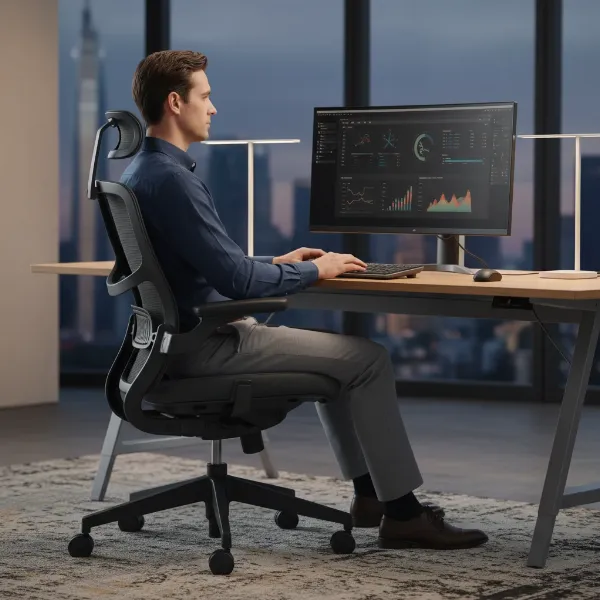 Person sitting with correct ergonomic posture in an adjustable office chair
1. What is an Ergonomic Chair?
An ergonomic chair is specifically designed to support the human body’s natural alignment and movements, promoting comfort and reducing the risk of strain and injury during prolonged sitting. Unlike conventional office chairs, ergonomic models offer a wide range of adjustability to custom-fit various body types and work styles.
1.1. Definition of an Ergonomic Chair
An ergonomic chair is a type of office chair engineered with principles of ergonomics to maximize efficiency and comfort in a working environment. These chairs feature multiple adjustable components that allow users to tailor the chair’s fit to their unique body dimensions, supporting optimal posture and minimizing physical stress over long periods. The goal is to create a seamless interface between the user and their workstation, reducing the likelihood of developing posture-related issues and musculoskeletal discomfort.
1.2. Benefits of an Ergonomic Chair
Investing time in properly adjusting an ergonomic chair yields substantial benefits for your health and overall well-being. These advantages extend beyond mere comfort, impacting your long-term physical health and daily work performance.
Posture Improvement
A well-adjusted ergonomic chair encourages the natural S-curve of your spine, preventing slouching and promoting an upright, healthy posture. By supporting your lumbar region and aligning your body, it helps reduce the strain that often leads to poor postural habits. This foundational support is essential for maintaining spinal health, particularly during extended periods of sitting.
Back and Neck Pain Reduction
One of the most immediate and appreciated benefits is the significant reduction in back and neck pain. Proper lumbar support, armrest positioning, and headrest alignment work together to alleviate pressure on spinal discs, muscles, and nerves. This targeted support helps to evenly distribute weight and reduce tension, mitigating the common aches and stiffness associated with desk work.
Increased Productivity
When you are comfortable and free from pain, your focus and concentration naturally improve. An ergonomic chair minimizes distractions caused by discomfort, allowing you to maintain better attention to your tasks. This enhanced comfort and reduced physical strain translate directly into increased productivity and a more enjoyable work experience.
2. Key Components of an Ergonomic Chair and Their Adjustments
Understanding the various adjustable components of your ergonomic chair is the first step toward achieving perfect posture. Each part plays a crucial role in supporting a different area of your body, and knowing how to manipulate them will allow you to customize your seating experience.
2.1. Headrest
The headrest is designed to support your head and neck, reducing strain on your upper spine and shoulders.
To adjust your headrest:
- Height: Position the headrest so it comfortably supports the natural curve of your neck and the back of your head, keeping your neck in a neutral, upright position with your chin slightly tucked in. Your eyes should be looking horizontally at your monitor.
- Angle/Depth: Some headrests also allow for angle or depth adjustments. Ensure it cradles your head without pushing it forward, maintaining contact throughout your workday to provide continuous support.
2.2. Backrest
The backrest is critical for spinal support, particularly in the lumbar region.
To adjust your backrest:
- Height: The most prominent part of the backrest cushioning, often designed for lumbar support, should align with the hollow of your lower back, around waist level. This maintains the natural inward curve of your lower spine. Adjust the backrest up or down until it snugly fits this curve.
- Angle: Most ergonomic chairs allow the backrest to recline or lock in various positions. For active work, an upright to slightly reclined position (100-110 degrees) is generally recommended. Reclining slightly can relieve pressure on your spinal discs.
- Tilt Tension/Lock: A tension knob, often found underneath the seat, controls how easily the backrest reclines. Adjust it so you can recline with a comfortable amount of effort for your body weight. The tilt lock allows you to fix the backrest in your preferred working angle.
Lumbar Support
Lumbar support is often integrated into the backrest and is vital for maintaining the natural curve of your lower spine. Many chairs offer adjustable lumbar support, which can be moved up, down, in, or out. Position it so that you feel consistent, gentle pressure supporting the inward curve of your lower back. This helps prevent slouching and reduces lower back strain.
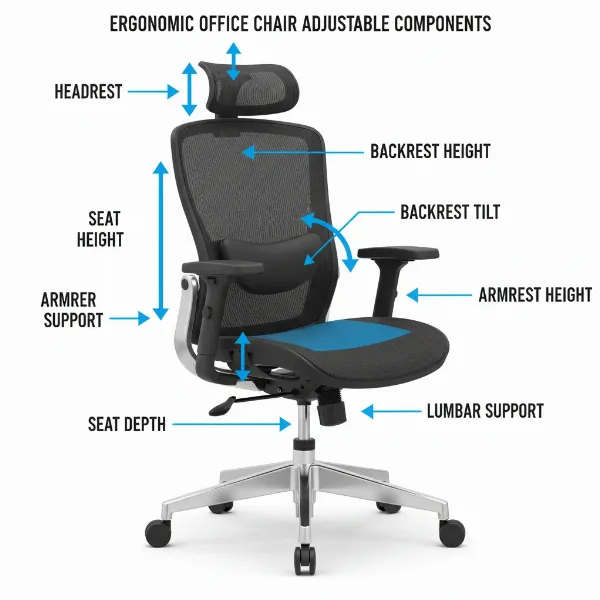 Diagram of an ergonomic chair highlighting its adjustable parts like seat, backrest, armrests
2.3. Armrests
Armrests support your upper body, reducing strain on your shoulders and neck.
To adjust your armrests:
- Height: With your shoulders relaxed and elbows bent at approximately a 90-degree angle, adjust the armrests so they barely touch the undersides of your elbows. Your forearms should be parallel to the floor, without your shoulders being pushed upward.
- Width: The armrests should be close enough to your body so your elbows remain under your shoulders, preventing outward “reaching” that can strain the rotator cuff.
- Depth/Pivot: Some advanced armrests can also move forwards/backwards or pivot inward/outward. Adjust these to ensure your forearms are supported while typing, allowing your wrists to remain straight and close to your body. If armrests prevent you from getting close to your desk, they should be removed or adjusted to fit underneath the desk.
2.4. Seat Cushion
The seat cushion provides the primary contact point for your lower body.
To adjust your seat cushion:
- Height: Stand in front of your chair and adjust the seat height so the highest point of the seat is just below your kneecaps. When you sit, your feet should be flat on the floor, your thighs parallel to the ground, and your knees bent at a 90-degree angle. If your feet don’t reach, use a footrest.
- Depth: Sit fully back in your chair. There should be a gap of about two to four inches (or a clenched fist) between the front edge of the seat and the back of your calves. This ensures proper blood circulation and prevents pressure behind your knees. Adjust the seat pan forward or backward until this clearance is achieved.
- Tilt: Some seats offer a tilt function. A slight forward tilt (5°-15°) can encourage a more upright posture by elevating your hips slightly higher than your knees. A horizontal or slightly backward sloping seat offers a relaxed position.
2.5. Chair Base
The chair base provides stability and mobility.
- Wheels and Stability: Ensure your chair has a stable five-point base with casters appropriate for your flooring (hard floor vs. carpet). This allows for easy movement while maintaining stability. A swivel mechanism is also essential, allowing you to turn without twisting your body.
3. Comparison Table of Ergonomic Chairs
While this article focuses on adjustment, understanding the range of chairs available can help you appreciate why certain adjustments are crucial. Here’s a comparative look at leading ergonomic chair brands, highlighting their general characteristics.
| Feature | Herman Miller | Steelcase | Haworth | FlexiSpot |
|---|---|---|---|---|
| Price Range | High-end | High-end | Mid to High-end | Budget to Mid-range |
| Key Models | Aeron, Embody, Sayl | Leap, Gesture, Think | Zody, Fern, Very | Ergonomic Office Mesh Chair, OC3B, OC12 |
| Adjustability | Extensive, intuitive, precise | Highly customizable, dynamic | Comprehensive, user-friendly | Good for the price, covers core adjustments |
| Material | Mesh (Pellicle), high-quality fabrics | High-performance fabrics, leather | Diverse, including recycled materials | Breathable mesh, various fabrics |
| Durability | Excellent, long warranties (12 years) | Excellent, robust construction | Very good, durable components | Good, designed for daily use |
| User Reviews | Often lauded for comfort & iconic design | Praised for adaptive support & comfort | Valued for aesthetics & ergonomic features | Appreciated for value & essential features |
| Target User | Design-conscious, long-term investment | Professional, task-intensive users | Modern office, design-focused | Home office, budget-conscious users |
“The true value of an ergonomic chair isn’t in its brand name, but in how meticulously it’s adjusted to fit your unique body mechanics. A perfectly tuned chair is an extension of your own posture.” – Dr. Emily R. Chen, Lead Ergonomist at Global Ergonomics Institute
4. Buying Guide: Finding Your Perfect Ergonomic Chair
Choosing the right ergonomic chair is a significant investment in your health and productivity. By considering your personal needs and understanding essential features, you can make an informed decision.
4.1. Identify Your Needs
Before even looking at chairs, take stock of your daily habits and physical requirements.
Daily Usage Time
How many hours a day will you be sitting in the chair? If it’s more than 4-6 hours, a highly adjustable, durable chair with advanced support mechanisms is crucial. For shorter periods, a simpler model might suffice.
Health Issues
Do you suffer from existing back pain, neck strain, carpal tunnel syndrome, or other musculoskeletal conditions? Specific chair features like enhanced lumbar support, adjustable headrests, or specialized armrests can alleviate these issues. Consult a healthcare professional or ergonomist for recommendations if you have severe conditions.
Budget
Ergonomic chairs range widely in price. Establish a realistic budget, but remember that a higher upfront cost can translate into better long-term health benefits, durability, and a more comfortable experience, potentially saving you money on medical expenses later.
4.2. Essential Features
A truly ergonomic chair offers a range of adjustments to cater to individual needs. Look for chairs that provide the following.
Height Adjustment
The ability to easily raise or lower the seat is fundamental. Your feet should rest flat on the floor with your knees at a 90-degree angle or slightly below your hips, and your thighs parallel to the floor.
Backrest Adjustment
The backrest should support the natural curve of your spine, especially the lumbar region. Look for adjustable backrest height and tilt mechanisms, allowing you to recline comfortably and lock the position.
Lumbar Support
This feature is paramount. Adjustable lumbar support, whether built-in or with an external cushion, helps maintain the natural inward curve of your lower back, preventing slouching and reducing pressure on your spine.
Adjustable Armrests
Armrests should be adjustable in height, width, and ideally, depth and pivot. They should allow your elbows to rest at a 90-degree angle with your shoulders relaxed, without hindering your proximity to the desk.
4.3. Material
The material of your chair impacts comfort, durability, and breathability.
Mesh
Often seen on modern ergonomic chairs, mesh offers excellent breathability, keeping you cool. It conforms well to the body, providing flexible support.
Leather
Leather provides a premium look and feel but can be less breathable than mesh. It’s durable and easy to clean but can retain heat.
Fabric
Fabric chairs offer a balance of comfort and breathability. They come in various textures and colors, providing good cushioning.
4.4. Reputable Brands
While specific models may vary, certain brands consistently deliver high-quality, adjustable ergonomic chairs.
- Herman Miller: Known for iconic designs like the Aeron and Embody, offering extensive adjustability and long warranties.
- Steelcase: Features chairs like the Leap and Gesture, celebrated for their adaptive support and robust construction.
- Haworth: Offers chairs such as the Zody and Fern, combining aesthetic appeal with comprehensive ergonomic features.
4.5. Testing and Trying
Never buy an ergonomic chair without trying it first, if possible.
Visit a Store
Sitting in a chair for at least 15-20 minutes will give you a real sense of its comfort and adjustability. Experiment with all the levers and knobs.
Read Online Reviews
Supplement your in-store experience by reading comprehensive online reviews, focusing on long-term comfort, durability, and how well the chair accommodates different body types. Look for insights from users with similar needs or physical concerns.
5. Popular Ergonomic Chair Models
The world of ergonomic chairs offers solutions for every need and budget. Here’s a glimpse into some popular categories.
5.1. High-End Ergonomic Chairs
These chairs represent the pinnacle of ergonomic design, often featuring advanced materials, extensive adjustability, and innovative technologies. Models like the Herman Miller Aeron or Steelcase Gesture offer unparalleled support, durability, and a sophisticated aesthetic, making them a long-term investment for professionals who spend significant time at their desks. They typically come with lengthy warranties, reflecting their quality and expected lifespan.
5.2. Budget-Friendly Ergonomic Chairs
For those with a tighter budget, many chairs offer essential ergonomic features without the premium price tag. Brands like FlexiSpot provide models with adjustable seat height, backrest tilt, and lumbar support, aiming to deliver core ergonomic benefits. While they may not have the same breadth of adjustments or high-end materials as their luxury counterparts, they are a significant upgrade from standard office chairs and can greatly improve posture and comfort for everyday use.
5.3. Ergonomic Chairs for Gamers
Gaming chairs have evolved to incorporate ergonomic principles, recognizing that gamers also spend extended periods seated. These chairs often feature aggressive styling, higher backrests with integrated headrests, and robust lumbar support. Brands like Herman Miller (with their Embody Gaming Chair) and various gaming-specific brands offer chairs that provide ergonomic benefits tailored to the unique postures and movements of gaming, aiming to prevent fatigue and discomfort during long sessions.
Conclusion
Mastering how to adjust your ergonomic office chair is not just about comfort; it’s a vital step towards safeguarding your health and optimizing your productivity. By methodically adjusting each component—from seat height and depth to backrest, armrests, and headrest—you can create a personalized seating solution that perfectly supports your body’s natural alignment. This proactive approach helps alleviate existing pain, prevents future musculoskeletal issues, and empowers you to focus better on your tasks.
Remember, an ergonomic chair is a tool, and like any tool, its effectiveness depends on proper use and calibration. Take the time to fine-tune your chair to your unique body, and don’t forget to incorporate regular movement breaks into your day to keep your body energized and your posture reset. Why settle for discomfort when the perfect posture is within your reach?
Frequently Asked Questions
How often should I readjust my ergonomic chair?
While your initial setup should aim for optimal posture, it’s beneficial to make minor adjustments throughout the day or whenever you change tasks. Regular small movements and variations in your sitting position, along with standing breaks every 20-30 minutes, are key to preventing static load and maintaining comfort and circulation.
Can an ergonomic chair really fix my back pain?
An Ergonomic Chair, when properly adjusted, can significantly reduce and often alleviate back pain by providing targeted support that maintains the spine’s natural curve and reduces pressure. However, it’s a tool for support, not a medical cure. For persistent or severe pain, consulting a healthcare professional is always recommended.
What are common mistakes people make when adjusting their office chair?
Common mistakes include sitting too far forward without back support, not having feet flat on the floor, setting armrests too high or too low, and failing to adjust lumbar support to the correct spinal curve. Many also overlook seat depth, leading to pressure behind the knees or inadequate thigh support.