Choosing the right ergonomic chair is a critical decision for anyone spending long hours at a desk. While many features contribute to comfort and support, the chair’s tilt mechanism stands as a cornerstone of proper ergonomics. Have you ever wondered why some chairs feel intuitively supportive as you lean back, while others leave you feeling unstable or with aching hips? The answer often lies in the engineering of its tilt system. This comprehensive guide will dissect the fundamental differences between synchro-tilt and standard tilt mechanisms, explaining how each works and which might be the perfect fit for your body and work style.
1. What is an Ergonomic Chair Tilt Mechanism?
At its core, a tilt mechanism in an ergonomic chair dictates how the seat and backrest move when you recline. It’s the engine that allows your chair to adapt to your body’s natural movements, transforming a static sitting experience into a dynamic one. The design of this mechanism significantly impacts your posture, comfort, and overall well-being throughout your workday.
1.1. Understanding Chair Tilt in Ergonomics
|
Our Picks for the Best Ergonomic Chair in 2026
As an Amazon Associate I earn from qualifying purchases.
|
||
| Num | Product | Action |
|---|---|---|
| 1 | Marsail Ergonomic Office Chair: Office Desk Chair with High Back Mesh and Adjustable Lumbar Support Rolling Work Swivel Task Chairs with Wheel 3D Armrests and Headrest |

|
| 2 | Fizzin Ergonomic Office Chair, 400 LBS Computer Chairs with Adjustable Lumbar Support, Breathable Mesh Desk Chair Ergonomic with Thickened Cushion, Comfy Home Office Desk Chair (Black) |
|
| 3 | Ergonomic Office Chair with Footrest - Adjustable Lumbar Support & Headrest, 90-160° Reclining Mesh Back Computer Chair - Home Office/Gaming, 350lbs Capacity (SGS Certified) |
|
| 4 | TRALT Office Chair - Ergonomic Desk Chair with Adjustable Lumbar Support, Mesh Computer Chair, Executive Chairs for Home Office Comfortable Lumbar Support (Black) |
|
| 5 | Ergonomic Office Chair, Mesh Seat Cushion with 3D Armrests and 3D Headrest, Adjustable Lumbar Support with 90-120° Rocking Function, SGS Class 4 Gas Clylinder, Black |
|
| 6 | Sweetcrispy Office Computer Desk Chair, Ergonomic High-Back Mesh Rolling Work Chairs with Wheels and Adjustable Headrests, Comfortable Lumbar Support, Comfy Flip-up Arms for Home, Bedroom, Study,Black |
|
| 7 | TRALT Office Chair Ergonomic Desk Chair, 330 LBS Home Mesh Office Desk Chairs with Wheels, Comfortable Gaming Chair, High Back Office Chair for Long Hours (Black) |
|
| 8 | Ergonomic Office Chair with Footrest - Adjustable Lumbar Support & Headrest, 90-160° Reclining Mesh Back Computer Chair - Home Office/Gaming, 350lbs Capacity (SGS Certified) |
|
| 9 | Marsail Ergonomic Office Chair Ergonomic Gaming Chair with Lumbar Support, 2D Headrest, Adjustable Armrests, Contoured Seat Cushion, Computer Desk Chair with Wheels for Home and Office |
|
| 10 | PatioMage Ergonomic Office Chair, Big and Tall Desk Chair with Adjustable Lumbar Support & Seat Depth, High Back Computer Chair, Swivel Mesh Chairs with Wheels for Home Office, Black |
|
In ergonomic design, a chair’s tilt functionality is paramount for promoting healthy movement and reducing sedentary risks. It’s not just about leaning back; it’s about supporting your spine through a range of motion. A well-designed tilt mechanism encourages subtle shifts in posture, preventing stiffness and distributing pressure evenly across your body. Without this crucial feature, even the most padded chair can lead to discomfort and poor spinal alignment.
1.2. Why Tilt Matters for Your Health
The ability to tilt your chair might seem like a minor luxury, but its impact on your health is profound. The right tilt mechanism can dramatically improve your sitting experience and long-term well-being.
- Posture Improvement: Tilting allows you to maintain the natural S-curve of your spine, especially the lumbar lordosis (the inward curve of your lower back). This reduces the tendency to slouch and keeps your body in a more neutral, supported position.
- Back and Neck Pain Reduction: By enabling dynamic movement and maintaining proper spinal alignment, a good tilt mechanism lessens the compressive load on your spinal discs. This significantly alleviates pressure points that often lead to lower back pain, neck strain, and shoulder discomfort.
- Increased Productivity: When you’re comfortable and free from pain, your focus and energy levels naturally increase. A chair that supports your body’s natural movements helps prevent fatigue, allowing you to concentrate on tasks rather than on discomfort. This leads directly to enhanced productivity and a more positive work experience.
2. Standard Tilt Mechanism Explained
Often found in more basic or entry-level office chairs, the standard tilt mechanism, also known as center-tilt or single-point tilt, is a simple yet common design. While functional for short periods, it comes with inherent limitations for prolonged ergonomic support.
2.1. Definition and How it Works
A standard tilt mechanism typically features a single pivot point located directly under the center of the seat pan. When you lean back, both the seat and the backrest tilt together in a fixed 1:1 ratio, meaning the angle between the seat and backrest remains constant. The entire chair essentially rocks backward from this central axis. This mechanism is often integrated into chairs where the seat and backrest form a single, unified shell.
2.2. Advantages of Standard Tilt
Despite its simplicity, the standard tilt mechanism does offer a few advantages, primarily in terms of cost and straightforward operation. Chairs with this mechanism are generally more affordable, making them a common choice for budget-conscious buyers or for environments where chairs are used sporadically. They are easy to understand and operate, often featuring a simple lever to lock the tilt and a tension knob to adjust recline resistance.
2.3. Limitations of Standard Tilt
While offering basic recline, the standard tilt mechanism presents several ergonomic drawbacks, particularly during extended use. The 1:1 recline ratio means that as the backrest reclines, the front edge of the seat also rises at the same rate.
> “A standard tilt system pivots from a single axis under the seat, making it simpler but less adaptive to natural body movements.” – BOSQ Ergonomics, Office Chair Specialists
This movement can cause your feet to lift off the floor, flattening your lower back (lumbar lordosis) and increasing pressure on the underside of your thighs. This creates discomfort and can impede blood circulation to your legs. Furthermore, the fixed angle between the seat and backrest doesn’t allow for independent adjustment, limiting the chair’s ability to conform to your body’s natural curvature as you change positions. Many standard tilt chairs also only allow locking the chair in the upright position, offering limited flexibility.
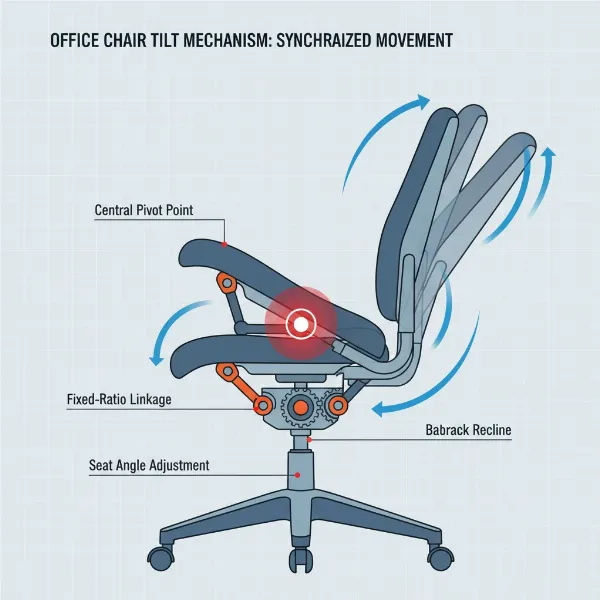 Illustration of a standard tilt mechanism in an office chair, showing the pivot point under the seat and the fixed angle recline
3. Synchro-Tilt Mechanism Explained
The synchro-tilt mechanism represents a significant leap forward in ergonomic chair design, offering a more natural and supportive reclining experience compared to its standard counterpart. It’s a hallmark of high-quality ergonomic office chairs designed for extended use.
3.1. Definition and How it Works
A synchro-tilt mechanism, short for “synchronized mechanism,” is an advanced ergonomic feature that allows the backrest and seat to move in a coordinated yet independent manner when you recline. Unlike the 1:1 ratio of standard tilt, synchro-tilt typically employs a ratio of 2:1 or 3:1. This means that for every 20 degrees the backrest reclines, the seat pan only tilts back approximately 10 degrees. The pivot point is usually located further forward, often near the knee. This synchronized movement keeps your body in a stable and comfortable posture throughout the recline, promoting active sitting.
3.2. Advantages of Synchro-Tilt
The carefully engineered movement of a synchro-tilt mechanism offers a multitude of ergonomic benefits that directly address the limitations of standard tilt. This advanced functionality contributes to a healthier and more comfortable sitting experience, especially during long workdays.
- Maintains Optimal Posture: The primary advantage is its ability to preserve the natural curve of your spine, including lumbar lordosis, as you recline. The synchronized movement ensures your back is continuously supported, minimizing the tendency to slump or flatten your lower back.
- Keeps Feet on the Floor: Because the seat tilts much less than the backrest, your feet remain comfortably on the floor or footrest, preventing uncomfortable pressure on your thighs and maintaining proper blood circulation to your legs.
- Encourages Movement: Synchro-tilt mechanisms promote dynamic sitting, allowing for slight shifts in posture that are crucial for spinal health and blood flow. This constant, gentle movement can significantly reduce static load on the spine and improve overall comfort.
- Open Hip Angle: Synchro-tilt often facilitates an “open” hip angle, typically between 110 to 120 degrees, as you recline. This wider angle reduces compressive load on the lower lumbar discs, estimated to be 20% to 30% lower than a rigid 90-degree posture, according to clinical observations and biomechanical modeling.
- Enhanced Adjustability: High-quality synchro-tilt mechanisms usually include tension control, allowing you to customize the recline resistance to your body weight, and multiple locking positions to fix the chair at various angles for different tasks.
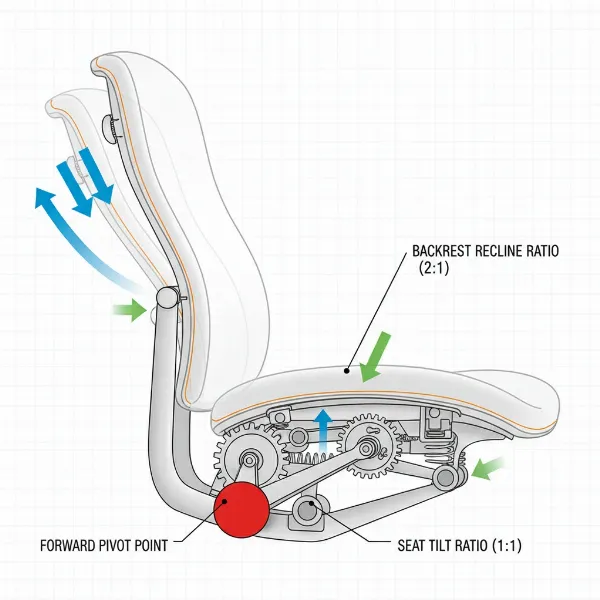 Technical illustration of a synchro-tilt mechanism, showing the independent, coordinated movement of the seat and backrest at a 2:1 ratio
4. Synchro-Tilt vs. Standard Tilt: A Detailed Comparison
Understanding the nuances between these two tilt mechanisms is crucial for making an informed decision when investing in an ergonomic chair. Here’s a comparative overview:
| Feature | Standard (Center) Tilt Mechanism | Synchro-Tilt Mechanism |
|---|---|---|
| Movement | Seat and backrest tilt together from a central pivot. | Seat and backrest recline in a coordinated, proportional manner. |
| Recline Ratio | Fixed 1:1 (e.g., 10° backrest = 10° seat tilt). | Typically 2:1 or 3:1 (e.g., 20° backrest = 10° seat tilt). |
| Lumbar Support | Limited; angle between seat and back is fixed, can flatten lumbar. | Excellent; maintains spinal curve and lumbar support during recline. |
| Foot Position | Feet may lift off the floor, increasing thigh pressure. | Feet generally remain on the floor, reducing thigh pressure. |
| Hip Angle | Often becomes more acute, potentially increasing spinal load. | Promotes an open hip angle (110-120°), reducing disc pressure. |
| Dynamic Sitting | Limited movement, can lead to static posture. | Encourages subtle movement and posture changes. |
| Adjustability | Basic tilt lock (often only upright) and tension control. | Multiple locking positions, tension control, sometimes forward tilt. |
| Ideal Use | Short sitting sessions, occasional use, meeting rooms. | Prolonged daily use, active work, those with back/posture concerns. |
| Price Range | Generally more affordable, budget-friendly. | Higher cost, premium ergonomic chairs. |
5. Choosing the Right Tilt Mechanism for You
Selecting the ideal tilt mechanism is a personal decision that should align with your daily habits, physical needs, and budget. It’s about finding the ergonomic sweet spot that supports your health and enhances your productivity.
5.1. Identify Your Needs
Before you even start looking at specific chairs, assess how you’ll be using it. Your individual requirements are the most crucial factor in determining which tilt mechanism will serve you best.
- Daily Usage Time: If you spend less than four hours a day in your chair, a standard tilt might suffice for basic comfort. However, for anyone sitting for five or more hours daily, a synchro-tilt mechanism becomes essential for long-term health and comfort.
- Health Issues: Individuals experiencing or prone to back pain, neck strain, or circulatory issues in their legs will significantly benefit from the dynamic support and spinal alignment offered by a synchro-tilt chair.
- Budget: Standard tilt chairs are typically more economical. If budget is a primary constraint for occasional use, it might be an acceptable compromise. However, consider the long-term health investment when evaluating higher-priced synchro-tilt options.
5.2. Essential Features to Consider
Beyond the core tilt type, specific adjustable features integrated with the mechanism can further enhance your ergonomic experience.
- Tilt Lock: This allows you to lock the chair’s recline at various angles. Synchro-tilt chairs often provide multiple locking positions, whereas standard tilt chairs may only lock upright.
- Tension Control: A crucial knob that adjusts the resistance of the tilt, allowing you to recline with effort proportional to your body weight. Both mechanisms can have this, but it’s particularly important in synchro-tilt for personalized comfort.
- Recline Range: Consider how far back the chair allows you to recline. Synchro-tilt generally offers a more expansive and comfortable recline range while maintaining support.
5.3. Material
While not directly related to the tilt mechanism itself, the material of your chair’s seat and backrest can affect how you perceive the tilt’s comfort. Breathable mesh, supportive fabric, or contoured foam cushions all contribute to the overall experience, ensuring you remain comfortable as the tilt mechanism supports your dynamic movements.
5.4. Reputable Brands
Many leading ergonomic chair brands specialize in advanced tilt mechanisms.
- Herman Miller: Known for their highly sophisticated tilt mechanisms, often variations of synchro-tilt that intuitively respond to your body.
- Steelcase: Features advanced synchronized mechanisms designed for dynamic support and seamless transitions between postures.
- Haworth: Offers chairs with unique “free-motion” or synchronized tilt systems that encourage active sitting.
5.5. Testing and Trying
The best way to determine the right tilt mechanism for you is through personal experience.
- Visit a Store: Whenever possible, sit in different chairs and test their tilt mechanisms. Pay attention to how your spine feels, if your feet stay grounded, and how natural the recline motion is.
- Read Online Reviews: Look for reviews that specifically mention the tilt mechanism, comfort during recline, and how it performs for long hours of sitting.
6. Popular Ergonomic Chair Models with Different Tilt Mechanisms
The market offers a vast array of ergonomic chairs, each integrating various tilt mechanisms to cater to diverse needs and budgets. From luxurious high-end options to more accessible choices, understanding where different tilt types are commonly found can guide your selection.
6.1. High-End Ergonomic Chairs
Premium ergonomic chairs almost universally feature advanced synchro-tilt or multi-functional tilt mechanisms due to their superior ergonomic benefits. Brands like Herman Miller (e.g., Aeron, Embody) and Steelcase (e.g., Gesture, Leap) are renowned for their highly refined synchronized systems that provide intuitive support, maintaining spinal alignment and keeping feet on the floor even in deep recline. These chairs often boast additional fine-tuning options like forward tilt and independent seat pan adjustment, representing the pinnacle of ergonomic design.
6.2. Budget-Friendly Ergonomic Chairs
While true synchro-tilt mechanisms tend to increase a chair’s price, some budget-friendly ergonomic chairs offer simplified versions or other tilt types. You might find basic chairs with standard (center) tilt mechanisms at lower price points. However, it’s crucial to evaluate these carefully for their long-term comfort and support, especially if you plan to use them for more than a few hours daily. Some mid-range chairs might offer knee-tilt mechanisms, which provide a better recline experience than standard tilt by pivoting closer to the knees, thus helping to keep your feet more grounded.
6.3. Ergonomic Chairs for Gamers
Gaming chairs often prioritize aggressive aesthetics and deep recline capabilities. While many advertise “ergonomic” features, their tilt mechanisms can vary widely. High-end gaming chairs from brands like Secretlab often incorporate multi-tilt or more advanced synchronized mechanisms, allowing for extensive recline while maintaining some level of ergonomic posture. More budget-oriented gaming chairs, however, might use simpler standard tilt mechanisms, which, when combined with their often bucket-seat design, can lead to less than ideal ergonomics for extended periods. When selecting a gaming chair, look for clear specifications on the tilt mechanism and prioritize those that offer synchronized movement for healthier gaming sessions.
Conclusion
The choice between a synchro-tilt and a standard tilt mechanism in your Ergonomic Chair is more than a preference; it’s an investment in your health and productivity. While a standard tilt might suit occasional use, the sophisticated, coordinated movement of a synchro-tilt mechanism offers unparalleled support, maintaining natural spinal alignment, keeping your feet grounded, and encouraging dynamic sitting. For anyone spending significant time at their desk, the benefits of synchro-tilt—reducing pain, improving posture, and boosting focus—make it the superior ergonomic solution.
When you sit, do you feel truly supported through every movement, or are you fighting against your chair’s limitations?