Ever finish a long day at your desk and feel that nagging ache in your neck and shoulders? You stretch, you roll your head, but the next day, it’s back again. You’ve probably wondered, What Is The Correct Monitor Height When Sitting to finally put an end to this discomfort? It’s a fantastic question, and the answer might be a little more connected to your chair than you think. Getting your monitor position right is crucial, but it’s only one piece of a much larger ergonomic puzzle. The real secret to a pain-free workday starts with the foundation of your entire setup: your chair.
Think of it like building a house. You wouldn’t start putting up walls and windows on a crooked foundation, right? The same logic applies to your workspace. Before we can perfect your screen height, we have to ensure your body is perfectly supported and positioned. That’s where a truly ergonomic chair changes the game.
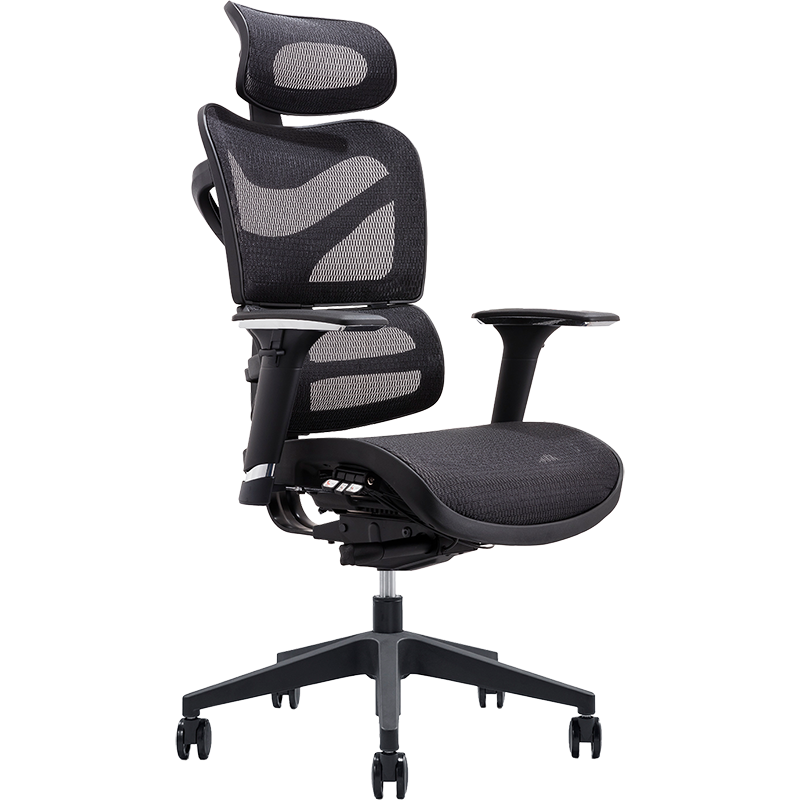
Why Your Chair Is the True Starting Point
You can have the best monitor in the world, but if you’re slouching, slumping, or perched awkwardly on a standard office chair, you’ll constantly be fighting a losing battle against bad posture. An ergonomic chair isn’t just a piece of furniture; it’s an active tool designed to work with your body, not against it. It sets the stage for everything else.
The core principle of ergonomics is to adapt the environment to the person, not the other way around. A good ergonomic chair allows you to adjust your own height and posture correctly, establishing the baseline from which all other adjustments—like monitor height—are made. Without this stable, supportive base, any adjustments you make to your monitor will just be temporary fixes.
What Exactly Is an Ergonomic Chair?
Let’s clear this up. The term “ergonomic” gets thrown around a lot, but a true ergonomic chair is more than just a comfy cushion and a high back. It’s a highly adjustable piece of engineering designed to support a neutral, healthy posture. This means it has multiple points of adjustment to fit your unique body shape and size, promoting proper alignment of your spine, neck, and limbs.
The Game-Changing Benefits for Your Health and Focus
Investing in a proper ergonomic chair isn’t a luxury; it’s a fundamental investment in your long-term health and daily productivity. When your body is properly supported, amazing things happen:
- Pain Relief is a Reality: The number one benefit is the significant reduction in back, neck, and shoulder pain. By supporting the natural curve of your spine, especially the lumbar region, it alleviates the pressure that builds up from hours of sitting.
- Posture Correction: It actively encourages you to sit correctly. Over time, this helps retrain your muscles, improving your posture even when you’re not at your desk.
- Increased Productivity and Focus: When you’re not constantly shifting around trying to get comfortable or distracted by pain, your brain is free to focus on the task at hand. You’ll find your concentration sharpens and your productivity soars.
- Improved Circulation: Poor posture can restrict blood flow. An ergonomic chair with a proper seat depth and waterfall edge (a gentle downward slope at the front) prevents pressure on the back of your thighs, promoting better circulation.
“Many people focus on treating the symptoms, like neck pain, without addressing the root cause. More often than not, the cause is a workstation that forces the body into unnatural positions for hours on end. The chair is the foundation of that workstation.” – Dr. Emily Carter, Physical Therapist
Must-Have Features of a Quality Ergonomic Chair
When you’re on the hunt, don’t be swayed by fancy marketing. Look for these core adjustable features. They are non-negotiable for a truly ergonomic experience.
- Seat Height Adjustment: This is the most basic feature. Your feet should be flat on the floor with your knees at a 90-degree angle, or slightly lower.
- Adjustable Lumbar Support: Your lower back has an inward curve. A quality chair will have lumbar support that can be adjusted for both height and depth to perfectly cushion this curve.
- Adjustable Armrests: Your armrests should be positioned so your shoulders are relaxed and your elbows are at a roughly 90-degree angle. They should be adjustable in height, width, and pivot.
- Seat Depth Adjustment: You should be able to sit with your back against the backrest while having 2-3 fingers of space between the front edge of the seat and the back of your knees.
- Backrest Recline and Tension: The ability to recline allows you to change positions throughout the day, reducing pressure on your spinal discs. The tension control should be adjustable to match your body weight.
- Swivel Base: A 5-star base with quality casters allows for easy movement without straining.
A Step-by-Step Guide to the Perfect Setup
Alright, let’s get you set up for success. Forget about your monitor for a second and follow these steps in order.
- Adjust Your Chair Height: Start by standing in front of your chair. Adjust the height so the highest point of the seat cushion is just below your kneecap. Now sit down. Your feet should be flat on the floor. If they’re dangling, the chair is too high. If your knees are above your hips, it’s too low.
- Set Your Seat Depth: Sit back, ensuring your lower back is flush against the backrest. Slide the seat pan forward or backward until you can comfortably fit two or three fingers between the edge of the seat and the back of your knees.
- Dial in the Lumbar Support: Adjust the lumbar support so it fits snugly into the natural curve of your lower back. It should feel supportive, not pushy.
- Position Your Armrests: Lower or raise the armrests until your elbows rest comfortably on them at a 90-degree angle. Your shoulders should feel completely relaxed, not hunched up.
- Adjust Your Backrest and Recline: Set the backrest to a comfortable, slightly reclined angle (around 100-110 degrees is ideal for working). Adjust the recline tension so you can lean back with gentle pressure but feel supported when you sit upright.
So, What Is the Correct Monitor Height When Sitting?
Now that your body is in the perfect position, we can finally answer the million-dollar question. With your posture set by your ergonomic chair, finding the correct monitor height when sitting is remarkably simple.
The short answer is: the top of your monitor screen should be at or slightly below your eye level. When you look straight ahead, your gaze should land on the top quarter of your screen. This position allows you to view the entire screen by slightly tilting your eyes down, keeping your neck in a neutral, relaxed position.
How do I achieve this?
- Sit Correctly: First, get into the ideal posture we just established in your ergonomic chair.
- Look Straight Ahead: Relax your neck and look forward naturally. Note where your eye level is.
- Adjust the Monitor: Raise or lower your monitor so that the top edge of the screen is at that level. You might need a monitor stand, an adjustable arm, or even a stack of sturdy books to get it right.
- Check the Distance: The monitor should also be about an arm’s length away. If you can comfortably touch the screen with your fingertips, you’re at a good distance.
- Add a Slight Tilt: Tilt the monitor back slightly (10-20 degrees) so that your line of sight is perpendicular to the screen’s surface. This helps reduce glare and further improves viewing comfort.
Ergonomic Chairs vs. Regular Office Chairs: A Quick Comparison
Still not convinced a dedicated ergonomic chair is worth it? Let’s break down the differences.
| Feature | Ergonomic Chair | Regular Office Chair |
|---|---|---|
| Adjustability | Highly adjustable (height, depth, arms, lumbar, recline) | Limited or no adjustability (usually just height) |
| Support | Designed to support the spine’s natural curve | Often flat-backed, forcing a slumped posture |
| Comfort | Long-term comfort by preventing strain and pain | Short-term comfort that leads to fatigue and pain |
| Material | High-quality, breathable materials for durability | Basic foam and fabric that wears out quickly |
| Health Impact | Promotes good posture, circulation, and reduces pain | Contributes to back pain, neck strain, and office syndrome |
Frequently Asked Questions
Q: Is it worth spending a lot of money on an ergonomic chair?
A: Absolutely. Think of it as a long-term investment in your health and productivity. A high-quality chair can prevent costly physical therapy or medical bills down the road and will last for many years, unlike cheaper chairs that need frequent replacement.
Q: How do I know if my current chair is causing my back pain?
A: If you consistently feel stiff or sore after sitting for an hour or more, your chair is likely a major contributor. Other signs include a lack of adjustable lumbar support and the inability to place your feet flat on the floor while your back is supported.
Q: Can an ergonomic chair fix my bad posture completely?
A: It’s a powerful tool, but not a magic bullet. An ergonomic chair makes it easy and comfortable to maintain good posture, but you still need to be mindful. Combining a good chair with regular breaks, stretching, and exercise is the best strategy.
Q: What if I work from home on a laptop?
A: Laptops are notoriously bad for ergonomics. The best solution is to create a dedicated workstation with an external monitor, keyboard, and mouse. This allows you to position your screen at the correct height while keeping your keyboard at a comfortable level. A laptop stand is a great alternative if an external monitor isn’t an option.
Q: How long does it take to get used to an ergonomic chair?
A: It can take a few days to a week. If you’ve been slouching for years, sitting with proper posture might feel strange at first as your muscles adapt to the correct alignment. Stick with it, and your body will thank you.
Your Health is Your Greatest Asset
In the end, understanding what is the correct monitor height when sitting is a critical part of creating a healthy workspace. But it’s a step that can only be properly taken after you’ve built a solid foundation. An ergonomic chair isn’t just about comfort; it’s about setting your body up for success, day after day. By investing in the right support, you’re not just buying a chair—you’re investing in a future with less pain, more focus, and better overall well-being. So take a look at your setup and ask yourself: is it working for you, or are you working for it?