A wobbly armrest on your office chair is more than just a minor annoyance; it’s a constant distraction that can undermine your comfort, compromise your posture, and ultimately reduce your productivity. That subtle shift can disrupt your focus during critical tasks, leading to unnecessary strain on your shoulders, neck, and back. Investing a little time in diagnosing and fixing a loose armrest can restore stability to your workspace and enhance your overall well-being. This comprehensive guide will walk you through the common culprits behind a wobbly armrest and provide practical, step-by-step solutions to get your chair back in top shape.
Why a Stable Armrest is Crucial for Ergonomics
An armrest is not merely a place to rest your elbows; it’s a fundamental component of an ergonomic seating system designed to support a neutral upper body posture. When your forearms are correctly supported, it significantly reduces the load on your neck, shoulders, and upper back muscles. This minimizes muscle strain, a key factor in preventing repetitive strain injuries (RSI) and other forms of discomfort that can arise from prolonged desk work. The U.S. Occupational Safety and Health Administration (OSHA) emphasizes that achieving a neutral body position is vital for preventing work-related musculoskeletal disorders. Stable armrests allow you to keep your elbows close to your body and your shoulders relaxed, directly contributing to this ideal ergonomic alignment.
Impact of a Wobbly Armrest
Conversely, an unsteady armrest forces your muscles to constantly micro-correct for instability. This continuous effort leads to fatigue and an increased risk of strain and injury. For anyone performing precision tasks, such as designers, editors, or gamers, a wobbly armrest can translate into shaky mouse movements, disrupting fine motor control and impacting accuracy. Beyond the physical toll, the constant instability serves as a low-level distraction, pulling you out of your workflow and hindering concentration. Addressing armrest wobble is thus a critical step not only for the longevity of your chair but for your personal health and performance.
 Person struggling with an unstable office chair armrest, showing discomfort and reduced focus.
Common Causes of a Wobbly Armrest
Before you can effectively fix a wobbly armrest, you need to pinpoint the source of the instability. Most armrest issues stem from a few common problems, ranging from simple loose hardware to more complex structural damage.
Loose Screws and Bolts
|
Our Picks for the Best Ergonomic Chair in 2026
As an Amazon Associate I earn from qualifying purchases.
|
||
| Num | Product | Action |
|---|---|---|
| 1 | Fizzin Ergonomic Office Chair, 400 LBS Computer Chairs with Adjustable Lumbar Support, Breathable Mesh Desk Chair Ergonomic with Thickened Cushion, Comfy Home Office Desk Chair (Black) |

|
| 2 | TRALT Office Chair Ergonomic Desk Chair, 330 LBS Home Mesh Office Desk Chairs with Wheels, Comfortable Gaming Chair, High Back Office Chair for Long Hours (Black) |
|
| 3 | Marsail Ergonomic Office Chair: Office Desk Chair with High Back Mesh and Adjustable Lumbar Support Rolling Work Swivel Task Chairs with Wheel 3D Armrests and Headrest |
|
| 4 | Ergonomic Office Chair with Footrest - Adjustable Lumbar Support & Headrest, 90-160° Reclining Mesh Back Computer Chair - Home Office/Gaming, 350lbs Capacity (SGS Certified) |
|
| 5 | Ergonomic Office Chair, Mesh Seat Cushion with 3D Armrests and 3D Headrest, Adjustable Lumbar Support with 90-120° Rocking Function, SGS Class 4 Gas Clylinder, Black |
|
| 6 | Sweetcrispy Office Computer Desk Chair, Ergonomic High-Back Mesh Rolling Work Chairs with Wheels and Adjustable Headrests, Comfortable Lumbar Support, Comfy Flip-up Arms for Home, Bedroom, Study,Black |
|
| 7 | PatioMage Ergonomic Office Chair, Big and Tall Desk Chair with Adjustable Lumbar Support & Seat Depth, High Back Computer Chair, Swivel Mesh Chairs with Wheels for Home Office, Black |
|
| 8 | TRALT Office Chair - Ergonomic Desk Chair with Adjustable Lumbar Support, Mesh Computer Chair, Executive Chairs for Home Office Comfortable Lumbar Support (Black) |
|
| 9 | Ergonomic Office Chair with Footrest - Adjustable Lumbar Support & Headrest, 90-160° Reclining Mesh Back Computer Chair - Home Office/Gaming, 350lbs Capacity (SGS Certified) |
|
| 10 | Marsail Ergonomic Office Chair Ergonomic Gaming Chair with Lumbar Support, 2D Headrest, Adjustable Armrests, Contoured Seat Cushion, Computer Desk Chair with Wheels for Home and Office |
|
This is by far the most frequent reason for a wobbly armrest. Over time, and with daily use, the screws or bolts that secure the armrest to the chair’s seat pan or frame can gradually loosen. The constant pressure and movement from leaning on the armrests contribute to this common wear.
Worn or Stripped Threads
If you try to tighten a screw or bolt and it just spins endlessly without securing, you likely have stripped threads. This can happen in the screw itself, the internal nut, or the hole in the chair’s frame (especially if it’s plastic). Stripped threads prevent the fastener from creating a tight, secure connection.
Damaged Internal Components (Bushings, Brackets)
Many adjustable armrests rely on internal mechanisms, such as plastic bushings, pivot pins, or metal brackets, to allow for height, width, or pivot adjustments. These components can wear down, crack, or become loose over time, causing instability even if the main mounting bolts are tight.
Broken Armrest Structure
In more severe cases, the armrest itself might be cracked or broken, particularly if it’s made of plastic. This structural failure requires a more involved repair or outright replacement, as simple tightening won’t resolve the underlying damage.
Essential Tools You’ll Need
Gathering the right tools before you begin will make the repair process smoother and more efficient. Most fixes for a wobbly armrest require only basic household tools.
- Screwdrivers: Phillips head and flathead screwdrivers are often needed for removing covers or tightening specific screws.
- Allen Wrenches (Hex Keys): Many office chairs use hex bolts for assembly, so a set of Allen wrenches is indispensable.
- Pliers: Useful for gripping small parts, bending wires, or holding nuts.
- Thread-locking Fluid (e.g., Loctite Blue): A medium-strength, removable threadlocker is excellent for preventing bolts from loosening again due to vibrations.
- Washers (Flat, Lock): These can reinforce connections and prevent bolts from digging into softer materials.
- Epoxy Resin (for severe cracks):): A strong adhesive suitable for repairing cracked plastic or metal components.
- Drill (for stripped holes/epoxy reinforcement): A small drill can be used to prepare stripped holes for new fasteners or to create anchor points for epoxy-based repairs.
- Metal Coat Hanger (for DIY staples): For advanced DIY repairs involving cracked plastic, a coat hanger can be repurposed for internal reinforcement.
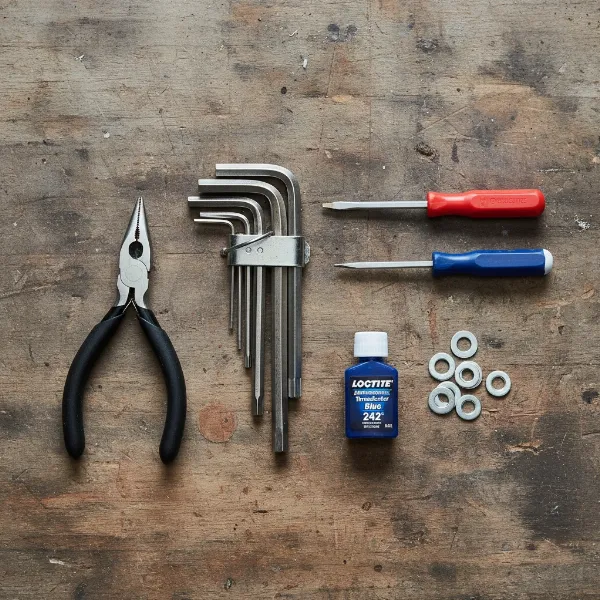 Assortment of tools needed for office chair armrest repair, including screwdrivers and hex keys.
Step-by-Step Guide to Fixing a Wobbly Armrest
Once you’ve identified the likely cause and assembled your tools, you can proceed with the repair. Always work methodically to ensure a lasting fix and prevent accidental damage.
Diagnose the Source of the Wobble
Before grabbing a wrench, take a moment to understand where the wobble originates.
-
Check External Mounting Bolts:
- Carefully tilt your chair or flip it over to access the underside of the seat.
- Visually inspect the bolts connecting the armrest bracket to the chair’s base. These are often M6 or M8 machine screws.
- Gently try to wiggle the entire armrest assembly at its connection point to the seat. If you see movement here, and the bolts appear accessible, these are likely the culprits. Use your fingers to see if any are noticeably loose.
-
Inspect the Armrest Post and Bracket:
- With the chair upright, hold the base of the armrest post (the part extending from the chair frame) and try to move it.
- Then, hold the arm pad itself and test for any play.
- If the entire post and pad move together, the issue is likely with the main mounting bolts (as in step 1). If the arm pad wobbles but the post is firm, the looseness is within the upper armrest assembly, often due to internal components.
-
Examine Internal Mechanisms:
- If external bolts are tight but the armrest still shifts, the problem might be internal. This often requires removing a plastic cover or shell from the armrest structure, usually held by small screws.
- Once exposed, look for worn-out plastic bushings, loose internal rivets, or cracked plastic housings. Stripped threads within plastic components are a common failure point.
Tightening Loose Screws and Bolts
This is the most straightforward fix for many wobbly armrests. However, avoiding the “tighter is better” myth is crucial. Overtightening can strip threads or crack plastic components.
-
Incremental Tightening Technique:
- Tighten all accessible bolts until they are finger-tight.
- Using your Allen key or screwdriver, give each bolt a quarter-turn. Then, go back and give each another quarter-turn. Continue this pattern until all bolts are firmly seated and snug. This evenly distributes pressure and prevents damage.
- Expert Tip: For M6-M8 bolts, finger-tight plus an additional 1/4 to 1/2 turn with a wrench usually provides ample clamping force without risking damage.
-
When to Use Thread-locking Fluid:
- If you find the same bolts repeatedly coming loose every few months, vibrations are likely causing them to back out.
- Remove the bolt, apply a few drops of a medium-strength, removable thread-locking compound (like blue Loctite) to the threads, then re-install and tighten using the incremental method. This creates a secure bond that resists loosening but can still be removed if needed.
Addressing Stripped Threads
Stripped threads require a more creative solution as simply tightening won’t work.
-
Larger Screws:
- If the original screw’s threads are stripped, try replacing it with a slightly larger diameter screw of the same length. This can sometimes catch new threads in the existing hole.
-
DIY Solutions for Stripped Holes:
- Paper Clip Method: Remove the screw. Unbend a paper clip and push one end into the stripped hole. Then, insert the screw; the paper clip will act as a filler, allowing the screw to bite and tighten.
- JB-Weld/Epoxy: For a more permanent fix, clean the stripped hole thoroughly. Fill the hole with JB-Weld or a strong epoxy. Let it cure completely, then drill a new pilot hole (slightly smaller than your screw) into the hardened material and re-insert the screw.
-
Epoxy with Staples (for Plastic): If the stripped hole is in a plastic component and prone to cracking, consider using epoxy reinforced with small metal “staples” made from a coat hanger. This is a more advanced repair.
Repairing or Replacing Worn Internal Components
If the wobble is internal, you might need to disassemble the armrest.
-
Replacing Bushings:
- If you find worn or cracked plastic bushings, the best option is replacement. While OEM parts can be hard to find, a local hardware store may offer metal split-washers or metal-reinforced bushings of a similar diameter. These are often more durable than original plastic parts.
-
Reinforcing with Washers:
- Sometimes, bolts loosen because the bolt head compresses or digs into a soft plastic boss on the armrest housing.
- Adding a simple metal flat washer between the bolt head and the plastic surface distributes the clamping force over a wider area, preventing deformation and creating a more secure connection.
Repairing Cracked Armrests (Advanced DIY)
For armrests with visible cracks, especially in plastic, a structural repair is needed. Do not attempt to glue a structural crack without reinforcement.
- Epoxy and Metal Staple Method:
- Disassemble: Carefully remove the cracked armrest from the chair.
- Prepare Reinforcement: Cut a section of metal coat hanger (about 30cm) and strip off any plastic coating. Bend small sections into “staples” with pliers, ensuring they are slightly smaller than the distance between anchor points you’ll create.
- Drill Holes: Using a small drill bit (slightly thicker than your wire), make several equidistant holes around the crack, ensuring they are not too close to the crack edge.
- Apply Epoxy & Insert Staples: Mix a two-part epoxy resin and apply it liberally into the crack. While wet, insert your metal staples into the drilled holes, pushing them across the crack. You might use rope and a screwdriver to gently squeeze the armrest and close the crack while the epoxy sets.
- Cure: Apply more epoxy over the staples for a strong bond. Allow the epoxy to cure fully (typically 12-24 hours) before reassembling the armrest.
Preventing Future Armrest Wobbles
Once you’ve successfully fixed your armrest, adopting good habits and performing regular maintenance can prevent future wobbles and extend the life of your chair.
Regular Maintenance Checks
Make it a habit to periodically inspect your office chair, particularly the armrests. At least every 3-6 months, check all accessible screws and bolts. Give them a gentle nudge to see if any have loosened, and tighten them as needed. This proactive approach can catch minor issues before they escalate into major repairs.
Proper Usage Habits
Avoid putting excessive, uneven pressure on your armrests. While they are designed to support your forearms, using them to push yourself up from the chair or leaning heavily on just one armrest can stress the connections and lead to premature loosening or damage. Distribute your weight evenly when getting in and out of the chair.
Ergonomic Adjustment
Even a perfectly stable armrest needs to be properly adjusted for optimal ergonomic support. Ensure your armrests are set to a height where your elbows are bent at roughly a 90-degree angle, with your forearms parallel to the floor. Your shoulders should be relaxed, not hunched. Adjust the width and pivot if your chair allows, bringing them inward so your arms are close to your body, providing comfortable support without forcing an unnatural posture.
Conclusion
A wobbly armrest on your office chair is an irritating but often solvable problem. By systematically diagnosing the source of the looseness—whether it’s loose hardware, stripped threads, or worn internal components—and applying the appropriate fix, you can restore stability and comfort to your workspace. From simple tightening with a thread-locking fluid to more involved repairs involving washers or epoxy, a bit of DIY effort can significantly extend the lifespan of your chair and improve your daily working experience. Remember, a stable and properly adjusted armrest is essential for maintaining good posture, reducing physical strain, and boosting your focus. Don’t let a minor wobble detract from your productivity and health; take action to secure your comfort. What steps will you take today to ensure your office chair provides the stable support you deserve?
Frequently Asked Questions
How often should I check my armrests for wobbling?
It’s a good practice to check your armrests and other chair components every 3 to 6 months. Regular, light maintenance can prevent small issues from becoming major problems, ensuring your chair remains stable and comfortable.
Can I use super glue for stripped screws?
While super glue might offer a temporary fix for stripped screws, it’s generally not recommended for long-term stability in areas under constant stress like armrests. It can make future disassembly difficult and may not provide sufficient strength. Thread-locking fluid (like blue Loctite) or repairing the hole with epoxy/JB-Weld and re-drilling is a more durable solution.
When should I replace an armrest instead of fixing it?
You should consider replacing an armrest if it has severe structural damage, such as a large crack that compromises its integrity, or if internal mechanisms are broken beyond simple repair (e.g., irreparable adjustment mechanisms). If repeated tightening or repair attempts fail to provide lasting stability, a replacement is often the most cost-effective and safest option.