Is your once-smooth-rolling office chair now scratching your floors, making annoying squeaks, or refusing to glide effortlessly? Worn-out or broken casters, often overlooked, can dramatically impact your comfort, productivity, and even the lifespan of your flooring. But before you consider replacing your entire chair, know that upgrading its wheels is a straightforward and cost-effective solution. This comprehensive guide will walk you through everything you need to know about replacing your office chair casters, from identifying the right replacements to a step-by-step installation process. You’ll soon have your chair rolling like new, preserving your floors and enhancing your workspace ergonomics.
1. What Are Office Chair Casters and Why Replace Them?
Casters are the unsung heroes of office chairs, providing the mobility that allows you to effortlessly move around your workspace. These small, wheeled devices are crucial for flexibility and comfort, reducing the need to strain your back or stand up simply to reach something across your desk.
1.1. Understanding Caster Basics
At their core, casters consist of a wheel and a stem that connects to the chair base. Understanding the stem type is vital for replacement. The two most common types are:
- Grip Ring Stem: This common type features a cylindrical stem with a metal C-clip or grip ring near the top. It pushes directly into a socket in the chair’s base and is held in place by this ring. Removal typically involves a firm pull.
- Threaded Stem: Less common but still present, these casters have a screw-like stem that threads into the chair base. They require unscrewing for removal, often with pliers.
|
Our Picks for the Best Ergonomic Chair in 2026
As an Amazon Associate I earn from qualifying purchases.
|
||
| Num | Product | Action |
|---|---|---|
| 1 | Marsail Ergonomic Office Chair: Office Desk Chair with High Back Mesh and Adjustable Lumbar Support Rolling Work Swivel Task Chairs with Wheel 3D Armrests and Headrest |

|
| 2 | Ergonomic Office Chair with Footrest - Adjustable Lumbar Support & Headrest, 90-160° Reclining Mesh Back Computer Chair - Home Office/Gaming, 350lbs Capacity (SGS Certified) |
|
| 3 | Fizzin Ergonomic Office Chair, 400 LBS Computer Chairs with Adjustable Lumbar Support, Breathable Mesh Desk Chair Ergonomic with Thickened Cushion, Comfy Home Office Desk Chair (Black) |
|
| 4 | Marsail Ergonomic Office Chair Ergonomic Gaming Chair with Lumbar Support, 2D Headrest, Adjustable Armrests, Contoured Seat Cushion, Computer Desk Chair with Wheels for Home and Office |
|
| 5 | PatioMage Ergonomic Office Chair, Big and Tall Desk Chair with Adjustable Lumbar Support & Seat Depth, High Back Computer Chair, Swivel Mesh Chairs with Wheels for Home Office, Black |
|
| 6 | Ergonomic Office Chair with Footrest - Adjustable Lumbar Support & Headrest, 90-160° Reclining Mesh Back Computer Chair - Home Office/Gaming, 350lbs Capacity (SGS Certified) |
|
| 7 | TRALT Office Chair - Ergonomic Desk Chair with Adjustable Lumbar Support, Mesh Computer Chair, Executive Chairs for Home Office Comfortable Lumbar Support (Black) |
|
| 8 | Sweetcrispy Office Computer Desk Chair, Ergonomic High-Back Mesh Rolling Work Chairs with Wheels and Adjustable Headrests, Comfortable Lumbar Support, Comfy Flip-up Arms for Home, Bedroom, Study,Black |
|
| 9 | Ergonomic Office Chair, Mesh Seat Cushion with 3D Armrests and 3D Headrest, Adjustable Lumbar Support with 90-120° Rocking Function, SGS Class 4 Gas Clylinder, Black |
|
| 10 | TRALT Office Chair Ergonomic Desk Chair, 330 LBS Home Mesh Office Desk Chairs with Wheels, Comfortable Gaming Chair, High Back Office Chair for Long Hours (Black) |
|
Beyond the stem, wheels vary in material and design. Most modern office chairs use twin-wheel casters, which distribute weight more effectively than single wheels, enhancing stability and prolonging the casters’ life.
1.2. Signs It’s Time for a Caster Upgrade
How do you know when it’s time to replace your chair’s wheels? Here are some clear indicators:
- Floor Damage: If your chair is leaving scuff marks, scratches, or gouges on your hardwood, laminate, or tile floors, your casters are likely made of a hard, unsuitable material.
- Poor Mobility: Difficulty rolling, sticky wheels, or a general lack of smooth movement are prime signs of worn-out or dirty casters.
- Noise: Persistent squeaking, grinding, or rattling sounds indicate that the internal mechanisms are degraded or heavily soiled.
- Physical Damage: Visible cracks, chips, or flat spots on the wheels compromise stability and functionality.
- Safety Concerns: A wobbly chair or one that feels unstable is a safety hazard, signaling an urgent need for replacement.
2. Choosing the Right Replacement Casters
Selecting the correct replacement casters is paramount for both performance and floor protection. A mismatched caster can lead to further damage or poor functionality.
2.1. Caster Types and Materials
The material of your casters should primarily be chosen based on your flooring type:
- Hard Floor Casters (Soft Tread): For surfaces like hardwood, laminate, tile, vinyl, or concrete, opt for casters made of softer materials like rubber or polyurethane. These materials provide better grip, reduce noise, and prevent scratches and scuff marks. “Rollerblade-style” wheels are a popular and effective choice for hard floors.
- Carpet Casters (Hard Tread): For carpeted areas, harder materials such as nylon or hard plastic are generally more suitable. They are designed to glide over carpet fibers without getting bogged down.
2.2. Stem Compatibility: Measuring for a Perfect Fit
The most critical aspect of compatibility is the stem. An incorrect stem size or type means the caster won’t fit your chair’s base.
- Measure Diameter and Length: Remove one of your existing casters. Use a ruler or calipers to measure the diameter (thickness) and length of the stem. Common diameters for grip ring stems are 7/16 inch (11mm), while threaded stems might be M8, M10, or M12.
- Identify Stem Type: Observe if your old caster has a grip ring or a threaded end. Take a photo of the stem as a reference when purchasing.
2.3. Wheel Size and Design
While most office chairs come with standard 2-inch wheels, you can often upgrade to larger sizes like 2.5 or 3 inches for enhanced performance. Larger wheels generally roll more easily, especially on carpet, and distribute weight over a wider area. Most office chairs use twin or dual-wheel designs, which offer good stability and maneuverability.
3. Tools You’ll Need for the Job
Replacing casters is a relatively simple DIY task, requiring only a few common tools:
- New Casters: The most important item! Ensure they are the correct type and size for your chair and floor.
- Work Gloves or a Towel: To get a better grip on stubborn casters and protect your hands.
- Flathead Screwdriver: Useful for prying out stuck casters. A wider blade (e.g., ½ inch / 13mm) provides more leverage.
- Pry Bar (Optional): For extremely stubborn casters, a small pry bar or even an automotive “pickle fork” can provide significant leverage.
- Lubricating Oil (e.g., WD-40): Helps loosen rusted or tightly fitted casters.
- Rubber Mallet (Optional): For gently tapping new casters into place if they are a tight fit.
- Tape Measure or Calipers: Essential for accurate stem measurement.
4. Step-by-Step Guide to Replacing Your Office Chair Wheels
Follow these steps to smoothly replace your office chair casters and get back to rolling with ease.
4.1. Preparation: Getting Your Chair Ready
- Clear Your Workspace: Make sure you have enough room to maneuver the chair safely.
- Position the Chair: Turn your office chair upside down or lay it on its side. This gives you full, easy access to the casters. If your chair is heavy, ask a friend for help.
- Inspect Old Casters: Take a moment to examine the existing casters. Note their overall condition, the stem type, and how they connect to the chair base.
4.2. Removing Old Casters
This is often the most challenging part, but with the right technique, it’s manageable.
- Grip and Pull: For most grip-ring casters, firmly grip the caster wheel with one hand and stabilize the chair leg or base with your other hand. Pull the caster straight out from the base with a strong, steady force. You might need to wiggle it a bit. Using a towel or work glove can improve your grip.
- Pry Out Stubborn Casters: If a caster doesn’t budge with pulling, use a flathead screwdriver. Insert the tip between the caster housing and the chair base. Gently pry downwards, rotating around the caster to apply pressure from different angles until it loosens and pops out.
- Lubricate (If Needed): For very stiff or rusted casters, apply a small amount of lubricating oil (like WD-40) to the area where the caster stem enters the chair base. Let it sit for a few minutes to penetrate, then try pulling or prying again.
- Dealing with Threaded Stems: If your caster has a threaded stem, you’ll need to unscrew it. Most threaded casters unscrew counter-clockwise. You may need pliers to get a good grip and turn the stem.
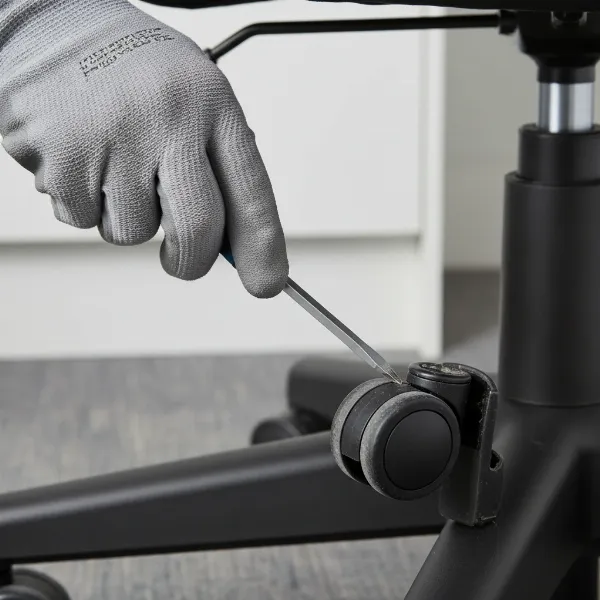 A close-up of a hand using a flathead screwdriver to pry a stubborn office chair caster from its base, demonstrating leverage.
4.3. Installing New Casters
Once the old casters are out, installing the new ones is usually quicker.
- Clean the Sockets: Before inserting new casters, take a moment to clean any dirt, dust, or debris from the caster sockets in the chair base. A clean socket ensures a secure fit.
- Align and Insert: Take a new caster and align its stem with the empty socket in the chair base.
- Apply Firm Pressure: For grip-ring casters, push the stem straight into the socket with firm, downward pressure until you hear or feel it snap securely into place. You might need to put some weight on the chair base or use a rubber mallet to gently tap the top of the caster housing until it’s fully seated.
- Screw in Threaded Stems: If you have threaded casters, carefully screw them into the chair base clockwise until they are tight and secure.
- Repeat: Install all remaining casters using the same method.
- Test: Flip your chair upright and test its movement on your floor. It should glide smoothly and silently.
“Don’t underestimate the impact of good casters. They’re not just about movement; they’re about protecting your investment in flooring and ensuring an ergonomic experience day in, day out.” – Alex Chen, Ergonomic Furniture Specialist
5. Maintenance Tips for Longevity
To ensure your new casters last for years to come, incorporate these simple maintenance habits:
- Regular Cleaning: Hair, dust, and debris can easily get tangled in caster wheels, hindering their movement. Periodically turn your chair over and clean the wheels with a cloth or a small brush. You might need to use scissors or pliers to remove stubborn hair.
- Lubrication: If your casters start to squeak or feel stiff after some time, a small spray of silicone lubricant (avoid oil-based lubricants on plastic components) can restore smooth operation.
- Check for Damage: Occasionally inspect your casters for any signs of wear, cracks, or loose components. Early detection can prevent more significant issues.
Conclusion
Replacing the wheels on your office chair is a simple yet impactful upgrade that can significantly improve your daily comfort and workspace aesthetics. By understanding the types of casters, choosing the right ones for your floor, and following a few easy steps, you can breathe new life into your office chair and protect your valuable flooring. This DIY project not only saves you the cost of a new chair but also empowers you to maintain your ergonomic setup effectively. So, are you ready to give your office chair the smooth ride it deserves?
Frequently Asked Questions
Are all office chair wheels universal?
No, office chair wheels are not universal. While many share a common stem size (7/16 inch or 11mm grip ring), there are variations in stem type (grip ring vs. threaded), stem dimensions, and wheel materials that need to match your chair and floor type for proper fit and function.
How often should I replace my office chair casters?
The lifespan of office chair casters varies greatly depending on usage, floor type, material quality, and user weight. On average, casters may need replacement every 2-5 years. However, if you notice floor damage, difficulty rolling, excessive noise, or visible wear, it’s time for an earlier replacement.
Can I use rollerblade wheels on any office chair?
Most rollerblade-style casters are designed with a standard 7/16″ (11mm) grip ring stem, making them compatible with the vast majority of office chairs that use this stem type. It’s crucial to measure your existing caster stem to confirm compatibility before purchasing.
What’s the best type of caster for hardwood floors?
For hardwood, laminate, or other hard floors, soft-tread casters made of rubber or polyurethane are highly recommended. These materials prevent scratching, reduce noise, and offer superior grip compared to hard plastic wheels. Rollerblade-style wheels are a popular and effective choice for these surfaces.
What if my old casters are really stuck?
If your casters are exceptionally stubborn, apply lubricating oil like WD-40 to the base of the stem and let it soak. Use a flathead screwdriver or a pry bar to create leverage, gently working around the caster to loosen it. For extreme cases, a specialized tool like an automotive pickle fork can provide the necessary force.